Start with native Obsidian capture if its available controls already do what you need. Consider Vox.md when you want its combination of Capture Presets, local speech backend choices, mixed media, and direct Markdown-folder delivery. Both can be part of the same vault workflow.
This comparison is published by Vox.md. It describes documented capabilities as of October 26, 2026, rather than a device benchmark. It does not rank transcription accuracy, battery use, or capture speed. Check your installed versions before choosing a workflow.
When native Obsidian is enough
Obsidian 1.14 documents Quick Capture on iOS 26 and later. It can create a note or add text to a daily or existing note. If you only need that, try the built-in workflow first. See Obsidian’s iOS guide.
The October 22 announcement for Obsidian 1.15 mobile early access adds live voice transcription and saved recordings, including Lock Screen capture on iOS 26. That release is labeled early access as of this comparison. Voice support should not be treated as absent from Obsidian simply because it is missing from an older installed build.
Obsidian’s core app is free, and Sync and Publish are optional paid services. Early-access builds are associated with Catalyst support. See Obsidian’s current pricing for the applicable terms. You do not need to buy another capture app just to keep using Obsidian.
Compare the capture workflows
The table summarizes the linked documentation. It does not mean a feature is impossible through an unlisted plugin, Shortcut, or later release.
On a small screen, swipe the table sideways to compare both options.
| Need | Native Obsidian | Vox.md |
|---|---|---|
| Quick text capture | Quick Capture in 1.14+, iOS 26+ | Quick Capture on iOS 17.6+, with feature-specific requirements |
| Daily and existing notes | Capture locations with append/prepend | New, rolling, or existing files; top, bottom, or heading placement |
| Templates and entry points | Templates, widgets and Shortcuts | Entry formatting, Capture Presets, widgets, Shortcuts and Share Sheet |
| Voice | 1.15 early access: live transcript and saved audio on iOS 26 | Apple Speech or optional Whisper/Parakeet; backend preparation required |
| Destination setup | Configured inside Obsidian | Permission to a writable folder through Files |
| Capture processing | Check current app and plugin options | Keep Original, Clean Prose, Todo Checklist, Meeting Notes or custom instructions; availability and fallbacks vary |
Vox.md’s OS minimum does not guarantee every speech engine or processing mode on an older phone. Live Apple Speech and Apple Intelligence have additional device, language and OS requirements. The compatibility table gives the feature-specific requirements.
When to add Vox.md
A Capture Preset combines the intended processing and output. For example, an Inbox preset can keep prose as written, while a Tasks preset can format entries and route them beneath a Tasks heading. Text processing is separately optional, so a typed note does not need to be rewritten.
The same composer can include text, a link, an attachment, a scan, a sketch, or voice. Vox.md writes Markdown and attachments into the folder you choose. That is useful when the note belongs in your existing file structure or when you want capture into a Markdown folder without requiring Obsidian.
For recording from the wrist, Vox.md has a documented Watch-to-iPhone workflow: record locally on Watch, then transcribe and deliver through the paired phone. This is not independent speech processing on Watch, and a queued recording is not a delivered Markdown note.
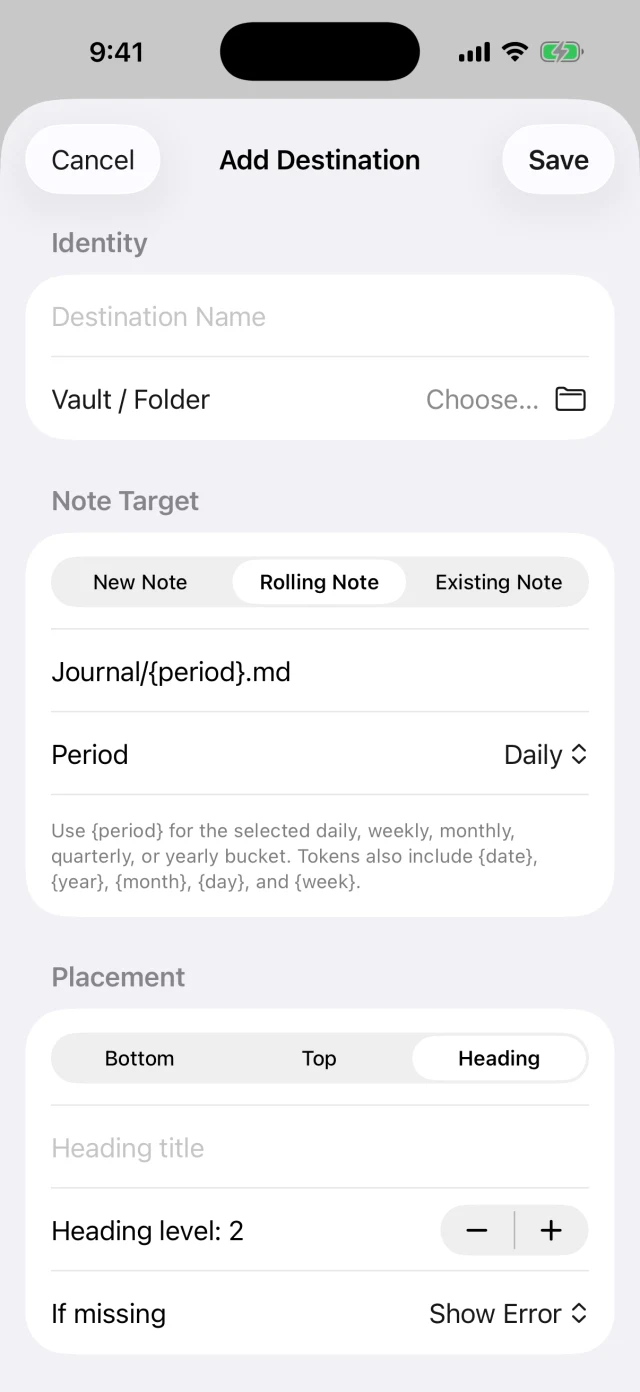
Vox.md includes 15 free transcription minutes and 10 successful Capture deliveries. Unlimited use is a one-time lifetime purchase; the App Store supplies the regional price. Those allowances let you check your destination before committing to a longer workflow.
Check file access and sync first
A vault visible inside Obsidian is not automatically available to Vox.md. The folder must appear in the Files picker and allow writes. Vox.md does not authenticate to the Obsidian Sync service. If your vault cannot be selected, native capture may be the more practical option for that setup.
Obsidian describes its local storage and the optional Sync service’s encryption on its pricing page. Vox.md transcribes on device, but a selected cloud-backed folder can still sync completed notes through its provider. Neither the phrase “local transcription” nor a Markdown export tells you how a separate sync provider handles the resulting file.
If you choose Vox.md, prepare its speech backend while connected and verify a short write. Cloud-backed folder availability and later sync are separate from on-device recognition. Avoid changing your vault’s sync arrangement or combining providers just to test a capture app.
Try a small workflow before deciding
- Pick one real destination, such as an Inbox note or today’s journal.
- Try the native capture option available in your installed Obsidian version. Check the resulting file and formatting.
- If you need Vox.md’s workflow, connect the same accessible folder and send one short capture. Compare the final Markdown, setup effort and review steps.
- For voice, review the transcript and retained audio settings. For Watch, confirm actual phone delivery before relying on unattended capture.
Keep the built-in option if it meets the need. Add another tool when a specific route or capture behavior makes the extra setup worthwhile.
Keep your vault.
Choose your capture workflow.
Try the route with your own folder and a short note before configuring more presets.