Before you start
Install Vox.md and open your vault in Obsidian on the same iPhone. Identify that vault's folder in Files. No Obsidian plugin or Vox.md account is required. This guide covers the iPhone workflow; file-provider availability and app labels can vary.
1. Create a daily-note Route
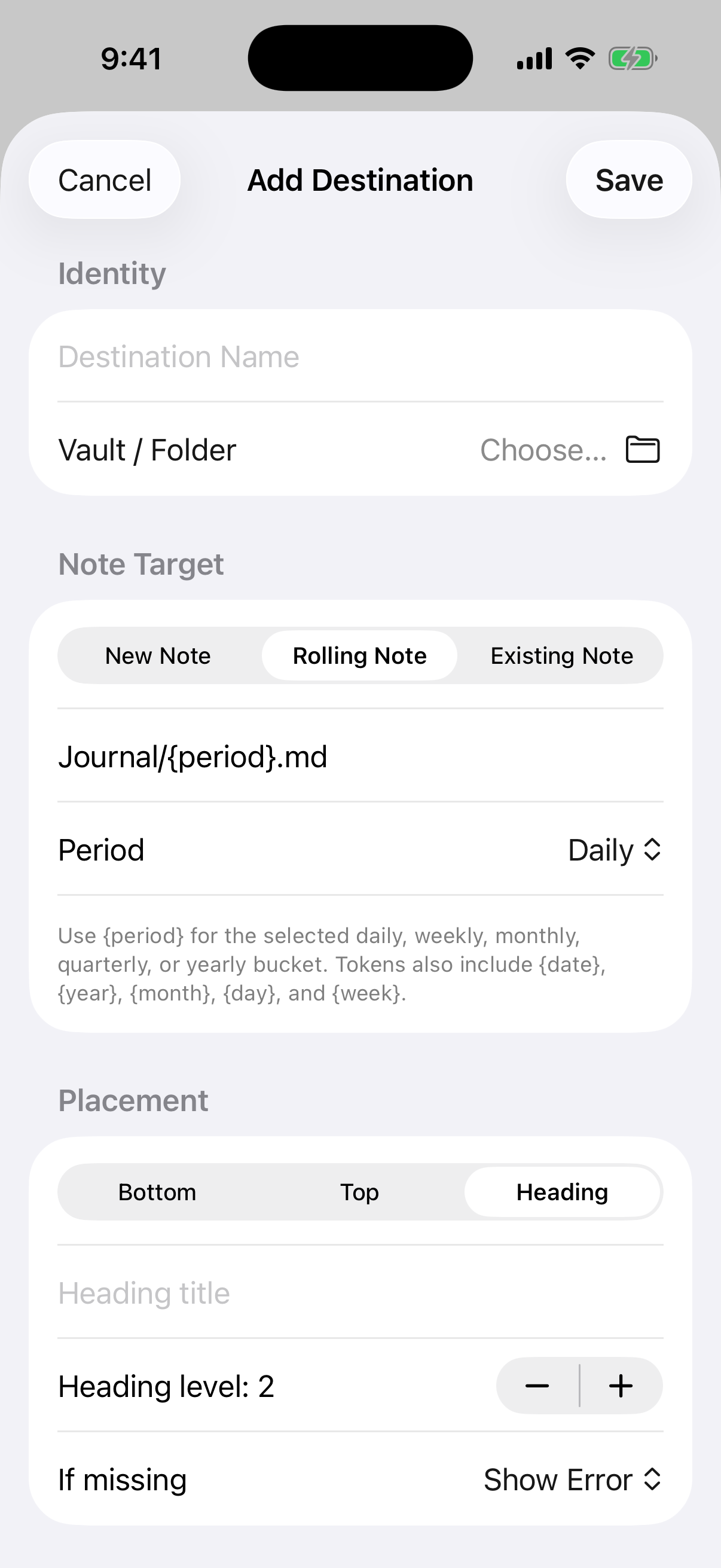
- Open Settings → Routes in Vox.md. Create a route called Daily Inbox.
- For a first test, choose Keep Original and leave typed-text processing off. This makes it easier to compare the text you send with the saved note.
- Set up the destination and select the folder of the vault you opened in Obsidian.
- Choose Rolling Note with a daily period. Use a path such as
Journal/{period}.md, or match your vault's actual daily-note folder and naming convention. - Choose heading placement, enter Inbox, and set the heading level to 2. Use bottom placement instead if you do not want a heading.
See destination options and placement rules. Existing Note is for one fixed file; Rolling Note follows the selected period.
2. Send one test and inspect the file
Select Daily Inbox in Quick Capture, type Book dentist appointment, then tap Send. Wait for Capture Sent. In Obsidian, open the note for that day and check the heading and entry. Verify the folder in Files too if you have similarly named vaults.
# October 25

## Inbox
Book dentist appointmentThis illustrative output uses a synthetic capture and a daily note dated October 25. Your template, metadata, and placement settings determine the exact file contents. Match the preview and saved filename to your own daily-note convention rather than creating a second daily-note series by accident.
3. Add voice after text delivery works
Record a short voice capture using the same route. Transcription runs on the device. A local model may need downloading before first use; Apple Speech availability depends on the device, system, and language. Check the transcript and destination before relying on unattended capture. See models and transcription.
Then add the Share Sheet, widgets, or Shortcuts to the workflow. Keep one verified destination as the starting point.
Troubleshooting reference · Library, limits, and purchases · Privacy details
Vox.md writes files to the destination you choose. If that vault syncs through iCloud or another service, its copies follow that service's settings. Content reviewed against the product documentation on October 25, 2026.
Get Vox.md on the App Store or read the complete documentation.